
Troubleshooting
- Positioning the Printer Heads, see page 20 of the SelfScore Scanner - Operator's Guide
Scantron Remark OMR Scanner Properties Configuration
In order for the Scantron scanner hardware to work with the Remark OMR software the following settings must be configured prior to scanning.
Open the Remark Classic OMR
Navigate to Tools > OMR Scanner > OMR Scanner Properties
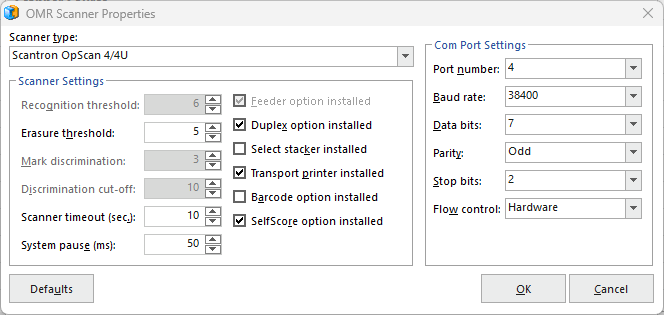
Scanner Type:
Scantron OpScan 4/4U
Change Port Number:
(Com4) usually, but check in device manager for USB COM.
Check Boxes:
Duplex Option installed
Transport printer installed
SelfScore option installed
OMR Scanner Properties settings screen shot:
(check that all numbers and settings are the same, again, note, the Port number may be different sometimes. You may check that in the Windows Device Manager > Ports > USB
Note: Under Tools > OMR Scanner, be sure that the OMR Scanner is default by checking "Set OMR Scanner as Default".

